Winapi-GUI-programming-in-Cpp17
Winapi GUI in C++17 Chapter 3 – General window creation & message handling, minimal.
❞ The best things in life are … annoying.
Table of Contents generated with DocToc
- Chapter 3. General window creation & message handling, minimal.
Chapter 3. General window creation & message handling, minimal.
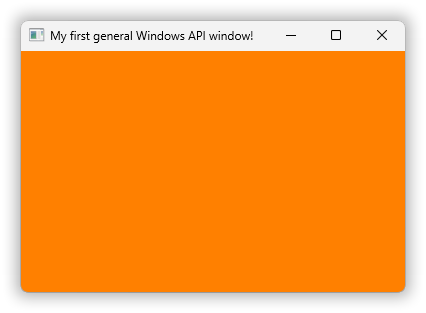
Our first general window will look like this:
3.1. Window parts.
in chapter 3. “General window creation & message handling, minimal”
The orange area is made orange by our C++ code. I.e. it’s not the Windows default. This area is called the client area because it’s the area where your code, the Windows API’s client code, presents stuff.
Above the client area is the window title bar with some control elements — when you click the window icon at the left you get a system menu (it can also be invoked via the Alt+space keyboard shortcut or by right-clicking the title bar), and the –, □ and × to the right are respectively minimize, maximize and close buttons.
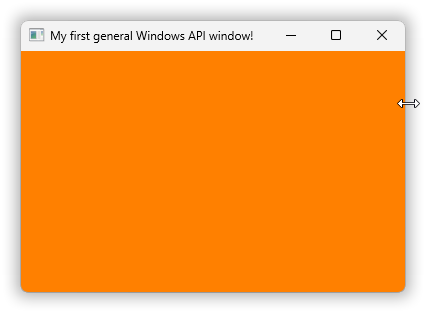
Around the client area and title bar is a window frame. In modern Windows it’s unfortunately difficult to see that this is a thick frame that can be used to resize the window. Conversely, a window with a thin frame (it looks just about the same in modern Windows) can’t be resized by the user. To show the resizability in the screenshot I placed the mouse cursor over the thick frame, whence it changes shape to ⇔ resizing. In the code the frame thickness and hence resizability is a “window style” flag passed to CreateWindow, where this code uses WS_OVERLAPPEDWINDOW which includes WS_THICKFRAME.
Here’s a screenshot showing the system menu in action:
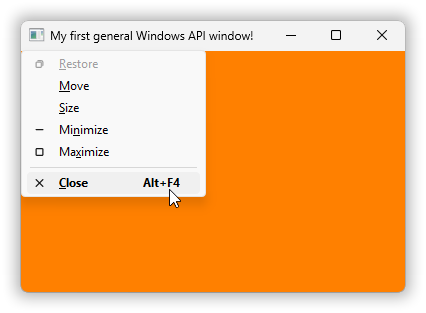
As that menu informs you you can use keyboard shortcut Alt+F4 to close the window. This was originally, in the 1980’s, part of the IBM Common User Access standard for keyboard shortcuts. When you click the desktop background and press Alt+F4 you’re closing the desktop window which then gives you the Windows shutdown dialog.
Alternatively you can double-click the window icon to close the window. But some windows like the modern Windows Calc window don’t use that default functionality — the common conventions are just that, conventions, not absolute law. With Calc the apparent window icon is just a graphic presented by Calc and double-clicking that graphic unreasonably maximises the calculator instead of closing the window, but even in Calc you can still access the system menu via Alt+space and via right-clicking.
3.2. Window creation.
in chapter 3. “General window creation & message handling, minimal”
3.2.1. Creating the Windows API “window class”.
in section 3.2. “Window creation”
in chapter 3. “General window creation & message handling, minimal”
Some of the visible aspects of this window are specified by its window class, which is a kind of template for window instances. We need to use that general mechanism even though this program only creates one window. There’s no predefined window class for a general main window so our code has to create one, and the parameters used for that creation are
In 03\code\empty-basic-window.v0.cpp:
const auto& window_class_name = L"A basic empty main window";

auto make_window_class_params()
    -> WNDCLASSW
{
    WNDCLASSW params = {};
    params.lpfnWndProc      = &window_proc;
    params.hInstance        = GetModuleHandleW( 0 );        // Not very useful in modern code.
    params.hIcon            = LoadIcon( 0, IDI_APPLICATION );   // ANSI or Wide, either is OK.
    params.hCursor          = LoadCursor( 0, IDC_ARROW );       // ANSI or Wide, either is OK.
    params.hbrBackground    = CreateSolidBrush( RGB( 0xFF, 0x80, 0x00 ) );          // Orange.
    params.lpszClassName    = window_class_name;
    return params;
};
The first parameter, the window proc, is a single callback function that handles events for the window. It defines the window’s looks and functionality by how it handles the events. In this program it uses default handling of all events except that it needs to terminate the program when the window is closed, which it does via its handling of the WM_DESTROY event.
The LoadIcon and LoadCursor calls use <windows.h> name macros. By default these names are mapped to respectively LoadIconA and LoadCursorA, which work fine with the default definitions of IDI_APPLICATION and IDC_ARROW. But if the symbol UNICODE is defined when <windows.h> is included then the name macros map to respectively LoadIconW and LoadCursorW, which work fine with the UNICODE-dependent definitions of IDI_APPLICATION and IDC_ARROW.
Since the result for these two functions is the same regardless of ANSI or wide function I just wrote it this way, using the macros. Otherwise the code would have had to require or ensure that UNICODE is defined, unlike our code examples so far. But we’ll do that in version 1 because as you’ll see that can avoid some nasty bugs.
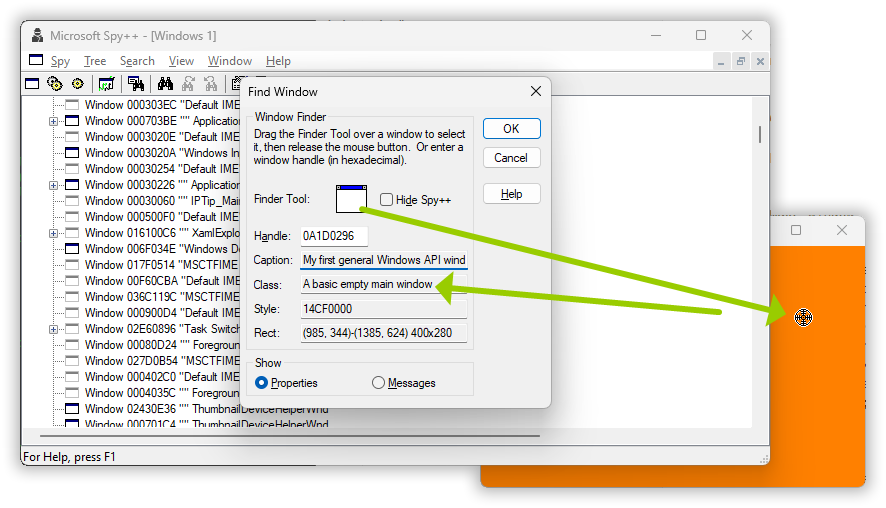
To create the window class the program passes these parameters to RegisterClass, which returns a 16-bit ATOM id for the new window class object. However to use that id with e.g. CreateWindow it needs to be reinterpreted as a pointer, so that’s both risky and cumbersome. And so instead it’s common to use the window class name, here “A basic empty main window”.
And you can see that name e.g. via Microsoft’s Spy++, command spyxx in an environment with the Microsoft tools available, e.g. after running vcvars64:
The window class creation:
In 03\code\empty-basic-window.v0.cpp:
enum Process_exit_code: int { success = 0, failure = EXIT_FAILURE };

auto run()
    -> Process_exit_code
{
    const WNDCLASSW window_class_params = make_window_class_params();
    RegisterClassW( &window_class_params );
    ⋮
This does not check whether the RegisterClass call succeeded because if it failed then CreateWindow will fail, and that’s checked.
3.2.2. Creating the window object.
in section 3.2. “Window creation”
in chapter 3. “General window creation & message handling, minimal”
The result of CreateWindow is a handle value that represents the new object.
In C and C++ a handle is typewise a pointer. By default some such as HBRUSH and HWND are distinct struct pointer types, and some such as HGDIOBJ are just void*. These types provide some safety for natural code, and they generally permit naturally meaningful implicit conversions, but it’s a very imperfect system so one still one needs to be careful!
Usually handle value 0 (a nullpointer) denotes error, but there are some exceptions. For example, CreateFile instead reports error by returning INVALID_HANDLE_VALUE which is -1 cast to HANDLE. But most common for a handle-returning function is that an error is reported via the nullvalue.
CreateWindow just uses the nullvalue as error indication:
In 03\code\empty-basic-window.v0.cpp:
    const HWND window = CreateWindowW(
        window_class_name,
        L"My first general Windows API window!",
        WS_OVERLAPPEDWINDOW,                        // Resizable and has a title bar.
        CW_USEDEFAULT, CW_USEDEFAULT, 400, 280,     // x y w h
        HWND(),                                     // Owner window; none.
        HMENU(),                                    // Menu handle or child window id.
        GetModuleHandleW( 0 ),                      // Not very useful in modern code.
        nullptr                                     // Custom parameter for app’s use.
        );
    if( not window ) {
        return Process_exit_code::failure;          // Avoid hanging in the event loop.
    }
The prefix WS_ for the “style” flags is short for window style. They’re single bit flags that specify window elements such as whether it has a title bar (caption), and behavior such as whether it’s disabled. WS_OVERLAPPEDWINDOW is defined as
#define WS_OVERLAPPEDWINDOW \
    (WS_OVERLAPPED | WS_CAPTION | WS_SYSMENU | WS_THICKFRAME | WS_MINIMIZEBOX | WS_MAXIMIZEBOX)
You can inspect or change the window style flags later. For example, most generally they can be changed via a call to SetWindowLongPtr with index GWL_STYLE. But for some flags there are dedicated functions that can be preferable to direct inspection or modification, e.g. the style WS_VISIBLE can be inspected via IsWindowVisible or changed via the function ShowWindow used below (WS_OVERLAPPEDWINDOW does not include WS_VISIBLE so the above creates a hidden window).
The CW_USEDEFAULT values for the window position cause the window to be placed automatically. By default Windows places windows in a diagonal down the screen and starts a new diagonal when it runs out of room. You can technically also use CW_USEDEFAULT for the width and height.
If window creation fails then a loop until the window closes would just hang, and so, considering the possibility of typos or resource depletion or whatever, this code checks if the window creation succeeded, and if not then it bails out.
3.2.3. Displaying the window.
in section 3.2. “Window creation”
in chapter 3. “General window creation & message handling, minimal”
A top level window is by default created hidden, meaning that it has no on-screen presentation. In this state you can populate the window with the contents that you want, without the user seeing that process. Then when all is ready you can call ShowWindow to make the window visible:
In 03\code\empty-basic-window.v0.cpp:
ShowWindow( window, SW_SHOWDEFAULT ); // Displays the window.
The SW_SHOWDEFAULT says to present the window as minimized, normal or maximized according to the parent process’ wishes.
However, for the first call to ShowWindow the SHOW_… specification is ignored. In the first call you get SW_SHOWDEFAULT no matter what you specify. And this is intentional documented behavior except that that documentation also includes some nonsense.
3.3. Window events, a.k.a. messages.
in chapter 3. “General window creation & message handling, minimal”
After creation the window’s life consists of handling events, in a very low level C style way.
The terminology here reflects the history of Windows’ creation. In the late 1970’s the Xerox corporation did a lot of groundbreaking research at their research center in Palo Alto, California, the Xerox PARC center. They invented local area networks, workstations with bitmapped displays, and not the least, in the Smalltalk project, object oriented techniques and user interfaces based on windows and mousing — at the time called WIMP: window, icon, menu, pointer.
Smalltalk is a dynamic object oriented language where method calls are called messages. This probably trickled down to Microsoft via Apple’s participation in a Xerox technology transfer program (look up the Apple Lisa). And so the window events in Windows are called “messages”, though they’re represented in C level type unsafe style with just an integer message identifier value such as WM_SIZE accompanied by two general integer values with message-dependent meanings.
The WM_ prefix is short for window message. There are a lot of them but for this program we’ll only be checking for WM_DESTROY which is a notification that the window’s being destroyed, and WM_QUIT which requests that the application terminates. WM_DESTROY is a message to a window while WM_QUIT, in spite of the WM_ prefix , is a message to the thread.
The main code’s responsibility after creating a window is to fetch messages from the thread’s message queue, and dispatch each to the relevant window’s handler. That handler is called a window proc. Which terminology again probably comes from Apple: after Smalltalk they used Pascal for their early work, and in Pascal a void function is called a “procedure”.
3.3.1. The message loop.
in section 3.3. “Window events, a.k.a. messages”
in chapter 3. “General window creation & message handling, minimal”
The message fetching and dispatching is called a message loop, here
In 03\code\empty-basic-window.v0.cpp:
    // Event loop a.k.a. message loop:
    MSG msg;
    while( GetMessageW( &msg, 0, 0, 0 ) ) {         // We’re ignoring that it can fail.
        TranslateMessage( &msg );           // Provides e.g. Alt+Space sysmenu shortcut.
        DispatchMessageW( &msg );           // Calls the window proc of relevant window.
    }
    assert( msg.message == WM_QUIT );
    return Process_exit_code( msg.wParam );
}
GetMessage returns 0 when it retrieves a WM_QUIT message, and otherwise non-zero. For successful calls the non-zero return value is positive, for errors it’s negative. But an error for GetMessage is an extremely rare occurrence so, while we’re going to address that in version 1 that possibility is commonly just ignored to get simpler code like this.
The TranslateMessage call is not strictly necessary but it provides e.g. the Alt+space shortcut for the system menu, by identifying certain keypress combinations and adding messages to the queue, called posting of messages.
Some messages instead bypass the queue and the above loop; more or less direct invocations of a window proc. This is called sending a message. Windows provides PostMessage and SendMessage to do this yourself when you might need it.
DispatchMessage does more than just identifying the receiver window and calling its window proc. It also supports hooks for inspecting the message stream, as used by e.g. Spy++, although that might (I don’t know) be accomplished by an internal call of SendMessage. Plus that it has special handling of WM_TIMER messages.
3.3.2. The window procedure.
in section 3.3. “Window events, a.k.a. messages”
in chapter 3. “General window creation & message handling, minimal”
The MSG structure includes a time stamp for the message, and in the Smalltalk project such time stamps were identified as crucial e.g. to be able to handle double-clicking (they also identified undecoded keyboards and bit blitting as crucial fundamentals). However in Windows the time stamp is not passed on to the handler, the window proc. Instead the window proc, if it needs it, may use GetMessageTime to get the time stamp of the message last fetched from the queue.
Anyway, that’s the — somewhat circular — reason why the window proc doesn’t have a time stamp parameter:
In 03\code\empty-basic-window.v0.cpp:
auto CALLBACK window_proc(
    const HWND          window,
    const UINT          msg_id,         // Can be e.g. `WM_COMMAND`, `WM_SIZE`, ...
    const WPARAM        w_param,        // Meaning depends on the `msg_id`.
    const LPARAM        ell_param       // Meaning depends on the `msg_id`.
    ) -> LRESULT
{
    if( msg_id == WM_DESTROY ) {
        // The window is being destroyed. Terminate the message loop to avoid a hang:
        PostQuitMessage( Process_exit_code::success );
        return 0;
    }
    return DefWindowProcW( window, msg_id, w_param, ell_param );    // Default handling.
}
The names w_param and ell_param, or in Microsoft-speak wParam and lParam, are short for word parameter and long parameter, reflecting original 16 and 32 bit sizes.
In modern 64-bit Windows both are 64-bit unsigned integers, but still only ell_param is used to represent actual pointers.
3.3.3. Default handling of messages.
in section 3.3. “Window events, a.k.a. messages”
in chapter 3. “General window creation & message handling, minimal”
DefWindowProc provides general default handling of a message. A different design is used for “dialog windows” where the higher level event handler returns 0 to request default handling. Regardless of mechanism, usually one either fully handles a message, or requests default handling, but not both.
3.4. The complete program, version 0.
in chapter 3. “General window creation & message handling, minimal”
Except for a trivial main the above discussed code is all, and here’s the single file:
03\code\empty-basic-window.v0.cpp:
#include <windows.h>

#include <cassert>          // assert
#include <cstdlib>          // EXIT_FAILURE

enum Process_exit_code: int { success = 0, failure = EXIT_FAILURE };

auto CALLBACK window_proc(
    const HWND          window,
    const UINT          msg_id,         // Can be e.g. `WM_COMMAND`, `WM_SIZE`, ...
    const WPARAM        w_param,        // Meaning depends on the `msg_id`.
    const LPARAM        ell_param       // Meaning depends on the `msg_id`.
    ) -> LRESULT
{
    if( msg_id == WM_DESTROY ) {
        // The window is being destroyed. Terminate the message loop to avoid a hang:
        PostQuitMessage( Process_exit_code::success );
        return 0;
    }
    return DefWindowProcW( window, msg_id, w_param, ell_param );    // Default handling.
}

const auto& window_class_name = L"A basic empty main window";

auto make_window_class_params()
    -> WNDCLASSW
{
    WNDCLASSW params = {};
    params.lpfnWndProc      = &window_proc;
    params.hInstance        = GetModuleHandleW( 0 );        // Not very useful in modern code.
    params.hIcon            = LoadIcon( 0, IDI_APPLICATION );   // ANSI or Wide, either is OK.
    params.hCursor          = LoadCursor( 0, IDC_ARROW );       // ANSI or Wide, either is OK.
    params.hbrBackground    = CreateSolidBrush( RGB( 0xFF, 0x80, 0x00 ) );          // Orange.
    params.lpszClassName    = window_class_name;
    return params;
};

auto run()
    -> Process_exit_code
{
    const WNDCLASSW window_class_params = make_window_class_params();
    RegisterClassW( &window_class_params );

    const HWND window = CreateWindowW(
        window_class_name,
        L"My first general Windows API window!",
        WS_OVERLAPPEDWINDOW,                        // Resizable and has a title bar.
        CW_USEDEFAULT, CW_USEDEFAULT, 400, 280,     // x y w h
        HWND(),                                     // Owner window; none.
        HMENU(),                                    // Menu handle or child window id.
        GetModuleHandleW( 0 ),                      // Not very useful in modern code.
        nullptr                                     // Custom parameter for app’s use.
        );
    if( not window ) {
        return Process_exit_code::failure;          // Avoid hanging in the event loop.
    }

    ShowWindow( window, SW_SHOWDEFAULT );           // Displays the window.

    // Event loop a.k.a. message loop:
    MSG msg;
    while( GetMessageW( &msg, 0, 0, 0 ) ) {         // We’re ignoring that it can fail.
        TranslateMessage( &msg );           // Provides e.g. Alt+Space sysmenu shortcut.
        DispatchMessageW( &msg );           // Calls the window proc of relevant window.
    }
    assert( msg.message == WM_QUIT );
    return Process_exit_code( msg.wParam );
}

auto main() -> int { return run(); }
Building with MinGW g++ is almost as simple as before because g++ links by default with Windows’ “kernel32.dll” and “user32.dll”, which is almost all that’s neeeded. The former is used by every program and provides e.g. GetModuleHandle, and the latter is the “user interface” DLL that provides all of the GUI-related functions used here, such as CreateWindow. However, this program also uses CreateSolidBrush and that function is provided by “gdi32.dll”, the original “graphics device interface” DLL:
[R:\03\code]
> g++ empty-basic-window.v0.cpp -lgdi32
Success!
But note: the order of arguments matters by default with g++. E.g. if you instead specify -lgdi32 before the source code file name, then the linker will see an unresolved dependency. It doesn’t matter (by default) that all it needs is there, because it’s in the wrong order, and then you get a linker error like
[R:\03\code]
> g++ -lgdi32 empty-basic-window.v0.cpp
C:/@/work/Winapi GUI in C++17/local work/installed/msys2/ucrt64/bin/../lib/gcc/x86_64-w64-mingw32/15.2.0/../../../../x86_64-w64-mingw32/bin/ld.exe: C:\Users\alfps\AppData\Local\Temp\ccl9IXIA.o:empty-basic-window.v0.cpp:(.text+0xe5): undefined reference to `__imp_CreateSolidBrush'
collect2.exe: error: ld returned 1 exit status
In this diagnostic the name prefix “__imp__” clearly indicates a DLL function, which sometimes can be helpful to know. However with the right order of arguments, as in the first example, building just succeeds. The Google search engine AI explains this order as “a library must appear after any object file or library that requires symbols (functions or variables) defined within it”.
With Visual C++ the order doesn’t matter but only “kernel32.dll” is linked in by default so both the User and the GDI libraries must be specified:
[R:\03\code]
> cl empty-basic-window.v0.cpp user32.lib gdi32.lib /Feb
empty-basic-window.v0.cpp
Result with both compilers:
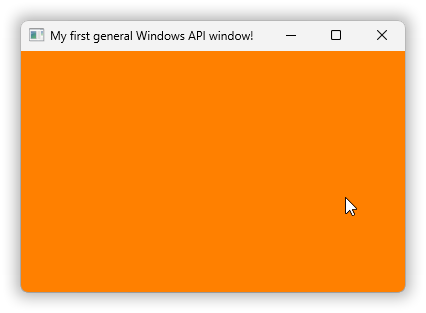
Worth noting: the ordinary arrow shaped mouse cursor when the mouse is over the window is the one specified in the window class; not coincidentally the same as the common mouse cursor elsewhere. Most every window is in on a conspiracy to maintain a user illusion that there is one common mouse cursor. But it’s a case of ~everybody voluntarily doing the same.
3.5. Avoid inadvertent use of ANSI functions by requiring UNICODE.
in chapter 3. “General window creation & message handling, minimal”
You may have noticed an apparent inconsistency and possible bug, that the message loop calls the wide function DispatchMessageW but also the apparent name macro TranslateMessage, which might resolve to an ANSI function?
However this is easily checked by just trying to append a W to the latter, showing that there is no such wide function:
[R:\03\code]
> g++ empty-basic-window.v0.cpp -lgdi32
empty-basic-window.v0.cpp: In function 'Process_exit_code run()':
empty-basic-window.v0.cpp:63:9: error: 'TranslateMessageW' was not declared in this scope; did you mean 'TranslateMessage'?
   63 |         TranslateMessageW( &msg );           // Provides e.g. Alt+Space sysmenu shortcut.
      |         ^~~~~~~~~~~~~~~~~
      |         TranslateMessage
Another way is to check which ANSI functions the program actually uses by listing the DLL imports with names that end with A. In order to limit this list to functions I use findstr with a pattern that specifies digit \d followed by any number of characters .* followed by an A at the end of the line, option /e. As before with the MinGW tools you can use objdump for the inspection of the executable’s innards (with MS tools use dumpbin):
[R:\03\code]
> objdump -p a.exe | findstr /e "\d.*A"
        000084d8  <none>  0247  LoadCursorA
        000084e0  <none>  024b  LoadIconA
The executable produced by Visual C++ additionally imports GetCommandLineA which the runtime uses to produce the arguments of main. With g++ that is apparently optimized away. Anyway the only ANSI functions explicitly used by the code are LoadCursorA and LoadIconA, and these are benign: ANSI or wide doesn’t matter for the very non-textual cursor and icon they produce handles to.
However, consider the function DefWindowProc. Unlike the two functions above its parameters do not distinguish between ANSI const char* and wide const wchar_t*; the parameters are all integers… And so it’s easy to inadvertently write literally “DefWindowProc” instead of “DefWindowProcW”, and when or if you do you’re using the name macro and the result will then depend on whether UNICODE is defined in the build.
In Visual Studio UNICODE is defined by default, hidden behind an innocuously looking setting named Character Set:
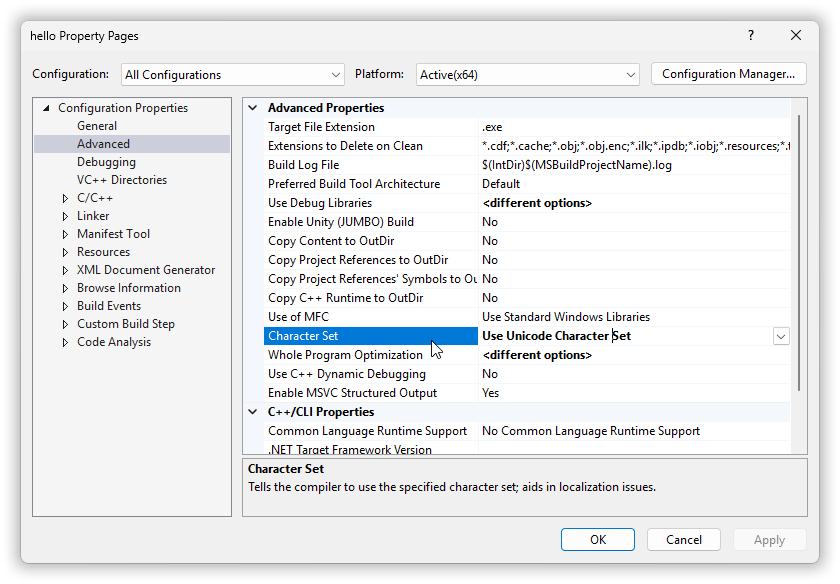
But the Visual C++ compiler that Visual Studio invokes does not itself provide that very Windows specific and year-of-usage specific default. And neither does the MinGW g++ compiler. So when you work in the command line you do not have UNICODE defined by default, and then a DefWindowProc in the source maps to DefWindowProcA:
[R:\03\code]
> objdump -p a.exe | findstr /e "\d.*A"
        000084c0  <none>  00a4  DefWindowProcA
        000084d8  <none>  0247  LoadCursorA
        000084e0  <none>  024b  LoadIconA
And the effect of that can be disastrous.
For our almost minimal program it just affects the window title. The code’s UTF-16 encoded wide text title gets set in the window via a WM_NCCREATE message, default-handled by DefWindowProcA. And that default handling assumes Windows ANSI encoding where the second byte of 16-bit L'M' (the first letter in the title) is a zero termination of the string:
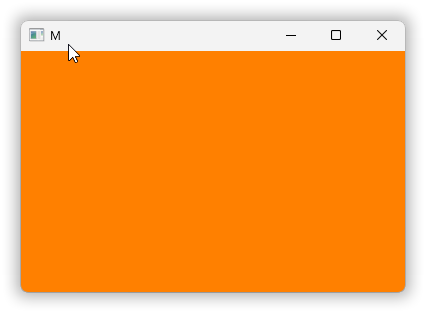
A good way to prevent such bugs is to require either UNICODE defined and use wide functions for everything, or UNICODE not defined and use ANSI functions for everything, preferably with UTF-8 encoding. With such requirement one can as well drop the A and W suffixes except where one very intentionally calls a function of the opposite set. Which, together with checking of possible GetMessage failure, constitutes a version 1 of this program, a no direct ungoodness starter version:
03\code\empty-basic-window.v1.cpp
#ifndef UNICODE
#   error "Please define UNICODE in the build (this is a wide function based program)."
#   include <terminate-compilation>     // Workaround for “must continue anyway!” g++.
#endif
#include <windows.h>

#include <cassert>          // assert
#include <cstdlib>          // EXIT_FAILURE

enum Process_exit_code: int { success = 0, failure = EXIT_FAILURE };

template< class T >
constexpr auto sign_of( const T& v ) noexcept -> int { return (v > 0) - (v < 0); }

auto CALLBACK window_proc(
    const HWND          window,
    const UINT          msg_id,         // Can be e.g. `WM_COMMAND`, `WM_SIZE`, ...
    const WPARAM        w_param,        // Meaning depends on the `msg_id`.
    const LPARAM        ell_param       // Meaning depends on the `msg_id`.
    ) -> LRESULT
{
    if( msg_id == WM_DESTROY ) {
        // The window is being destroyed. Terminate the message loop to avoid a hang:
        PostQuitMessage( Process_exit_code::success );
        return 0;
    }
    return DefWindowProc( window, msg_id, w_param, ell_param );     // Default handling.
}

const auto& window_class_name = L"A basic empty main window";

auto make_window_class_params()
    -> WNDCLASS
{
    WNDCLASS params = {};
    params.lpfnWndProc      = &window_proc;
    params.hInstance        = GetModuleHandle( 0 );         // Not very useful in modern code.
    params.hIcon            = LoadIcon( 0, IDI_APPLICATION );
    params.hCursor          = LoadCursor( 0, IDC_ARROW );
    params.hbrBackground    = CreateSolidBrush( RGB( 0xFF, 0x80, 0x00 ) );          // Orange.
    params.lpszClassName    = window_class_name;
    return params;
};

auto run()
    -> Process_exit_code
{
    const WNDCLASS window_class_params = make_window_class_params();
    RegisterClass( &window_class_params );

    const HWND window = CreateWindow(
        window_class_name,
        L"My first general Windows API window!",
        WS_OVERLAPPEDWINDOW,                        // Resizable and has a title bar.
        CW_USEDEFAULT, CW_USEDEFAULT, 400, 280,     // x y w h
        HWND(),                                     // Owner window; none.
        HMENU(),                                    // Menu handle or child window id.
        GetModuleHandle( 0 ),                       // Not very useful in modern code.
        nullptr                                     // Custom parameter for app’s use.
        );
    if( not window ) {
        return Process_exit_code::failure;          // Avoid hanging in the event loop.
    }

    ShowWindow( window, SW_SHOWDEFAULT );           // Displays the window.

    // Event loop a.k.a. message loop:
    for( ;; ) {
        MSG msg;
        switch( sign_of( GetMessage( &msg, 0, 0, 0 ) ) ) {
            case +1: {
                TranslateMessage( &msg );           // Provides e.g. Alt+Space sysmenu shortcut.
                DispatchMessage( &msg );            // Calls the window proc of relevant window.
                continue;
            }
            case 0: {
                assert( msg.message == WM_QUIT );
                return Process_exit_code( msg.wParam );
            }
            case -1: {
                return Process_exit_code::failure;
            }
        }
    }
}

auto main() -> int { return run(); }
Ah, it’s much cleaner without those pesky suffixes!
In passing, the definition of sign_of is idiomatic. I chose pass-by-reference to show how it should be for a reusable definition placed in some header. Think about e.g. arbitrary precision arithmetic with a zillion digits per number.
Compilation showing that the check for UNICODE works in an almost practical way also with g++:
[R:\03\code]
> g++ empty-basic-window.v1.cpp
empty-basic-window.v1.cpp:2:5: error: #error "Please define UNICODE in the build (this is a wide function based program)."
    2 | #   error "Please define UNICODE in the build (this is a wide function based program)."
      |     ^~~~~
empty-basic-window.v1.cpp:3:13: fatal error: terminate-compilation: No such file or directory
    3 | #   include <terminate-compilation>     // Workaround for “must continue anyway!” g++.
      |             ^~~~~~~~~~~~~~~~~~~~~~~
compilation terminated.
Compilation showing how to do all correctly:
[R:\03\code]
> g++ empty-basic-window.v1.cpp -D UNICODE -lgdi32
Or with Visual C++:
[R:\03\code]
> cl empty-basic-window.v1.cpp user32.lib gdi32.lib /D UNICODE /Feb
empty-basic-window.v1.cpp
Result: